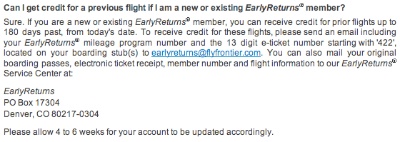
During a recent stay in the US, I had been on two United Airlines flights. Like Lufthansa, United is a member of the “Star Alliance” group of airlines. Being a member of Lufthansa’s Miles & More loyalty program, I should have earned award miles for the United flights, but since someone else had made the booking for me, I had not been able to supply my membership number.
Unsurprisingly, when I later checked my Miles & More account, I had not received any miles for the two flights, and — ticket stubs close at hand — I set out to claim those uncredited miles via the Miles & More website.
Finding the claim form
After signing in, I went to the page with the detailed account statement. Since this page lists all recent account transactions, I thought this also was the most logical place to look for information on what to do if any transactions were logged incorrectly or simply missing.
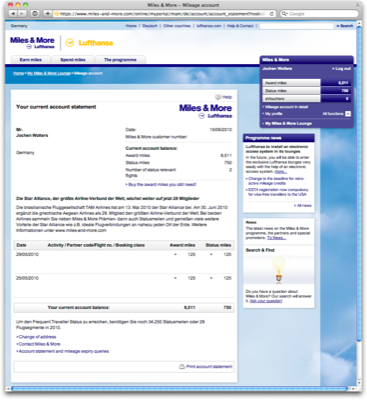
Scanning that page for a link or a button titled “request mileage credit,” “claim uncredited miles,” or similar, yielded no result. The only link that looked mildly promising was “Account statement and mileage expiry queries” at the very bottom of the page.
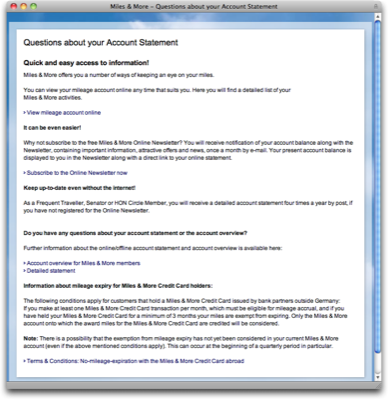
I clicked on it, expecting to find concise and helpful information about what I could do within the context of the account statement page. What I got, instead, was too much marketing ramble — “Quick and easy access to information!”, “Why not subscribe to the free Miles & More Online newsletter?”, etc. — and too little helpful information. Neither seemed relevant to my task.
Next, I tried searching for “claim miles,” “get miles,” “credit miles,” “uncredited miles,” etc. via the website’s general search field. While some of the links in the search results did take me to the correct page for claiming miles– which happens to be titled “Mileage request” –, all of them were hidden behind tangential questions like “What is the time limit on the retrospective crediting of miles?”
Not one of the results included something as plain, simple, and straight-forward as “How do I claim uncredited miles?”
Now that I knew that “mileage request” is the term Lufthansa uses for “claiming uncredited miles,” I again searched the account statement page for a direct link to the claim form.
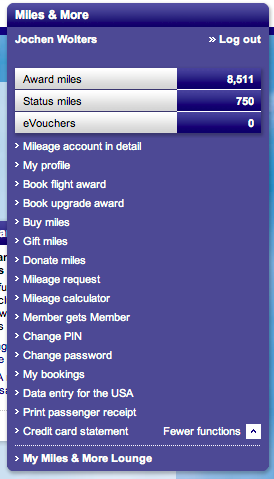
It does exist, and it is listed in the navigation menu in the account statement page’s top right corner. When opening that page, however, you cannot see it immediately, because, for some obscure reason, the designers must have thought that it is a briliant idea to hide most of the navigation menu. To disclose the entire menu, you have to click on “All functions.”
Unfortunately, there are more problems with that menu than just the fact that most of its items are hidden by default.
A navigation menu gone awry
Apart from the two words, “All functions,” there are no visual cues in that blue box that point to the existence of a hidden menu.
The icon next to the link does not resemble a standard disclosure triangle as found in, e.g., the Mac OS X Finder or Windows Explorer, and it points to the right, seemingly to a location off the screen. Which may make you wonder whether clicking it will take you to another page showing, well, all functions.
Once opened, the menu is overwhelming: the font is very small (and, consequently, so are the link target areas); there is no grouping; and the sort order seems arbitrary.
E.g., “Change PIN” and “Change Password” seem to be related to the “My profile” item, yet they are placed far apart from each other. “Book flight award” is about spending miles, as is “Gift miles”. And yet, they are separated by “Buy miles,” which is related to earning miles.
As for the menu items themselves, they seem overly curt. Adding a bit of redundance — e.g., using “Donate miles to charity” vs. “Donate miles” — may help grasping their meanings faster. Also, there is a subtle difference in the syntax of the items: some consist solely of nouns like “Mileage calculator,” whereas others contain a verb, as in “Buy miles”.
By the way, would you guess that the rather unforunately phrased “Member gets Member” takes you to a page for inviting someone to join Miles & More?
Just for kicks, here’s a suggestion for how I’d spruce up that menu by grouping the menu items and giving them somewhat more verbose labels, thus making better use of the available horizontal space.
(Note that I have removed the “Change password” and “Change PIN” items, because I would probably move those to the “My profile” page.)
MY ACCOUNT
View my detailed mileage statement
View my credit card statement
Go to my profile
MY ITINERARY
View my bookings
Print passenger receipt
Enter passenger data for visits to the USA
EARN MILES
Calculate the miles you earn
Claim uncredited miles
SPEND MILES
Book a flight award
Book an upgrade award
Give miles as a gift
Donate miles to charities
Invite a friend to join Miles & More
Submitting a “mileage request”
As I stated before the menu diatribe intermezzo, I had managed to find the appropriate page for having the miles from those two United Airlines flights “retrospectively credited” to my account. One more click on that page took me to the form for entering my flight details.
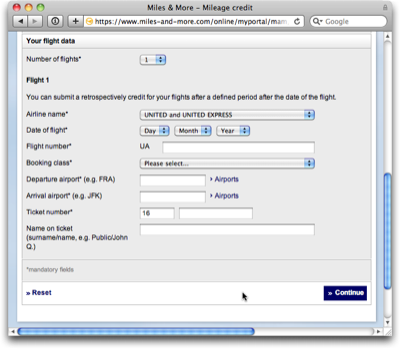
A very welcome feature of this form is the “Number of flights” popup menu: you can enter up to ten flights in one session, which, I would assume, should be more than enough for most travelers.
Unfortunately, there is a lot of information that needs to be entered per flight, however, and it is not all that obvious where to find the respective data on the ticket stub. A page called “Ticket examples” that explains where to find what, comes in really handy at this point.
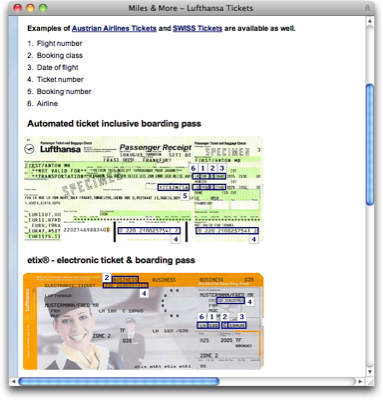
I do wonder, though, why I needed to enter the departure and arrival airports: shouldn’t the website’s database backend “know” a flight’s route based on the flight number and flight date, which I had to provide, as well?
When you’ve completed your data entry, and clicked the submit button, a summary page is shown, and when you confirm that, you’ll see a confirmation page, informing you that “Your flight is forwarded for verification.”
After a few weeks’ time, I re-checked my account, and the miles for the two United flights had been “retroactively credited.” But while the task was finished successfully, it could have been quite a bit easier if…
-
the Lufthansa website would use more intuitive wording for the task of “submitting a request to add award miles to my account for a flight that does not show up in my statement yet,”
-
the search engine would find results based on more common search terms than “retroactive milage credit,”
- the navigation menu was not hidden by default,
- the request form would not require entering so many data items.
Same task, different approach
For a quick comparison, I went to the British Airways website to see what their implementation of this workflow looks like.
Similar to the Lufthansa website, British Airways’ site provides both a concise account overview and a detailed account statement. Right beneath the list of transactions on the latter page, there is a nondescript box, titled “See also”. And what do you know is inside that box: a link, saying “Claim missing BA Miles.”

As I said earlier, I assume that claiming uncredited — or “missing” — miles is one of the most often-used functions on the account page. Unlike their Lufthansa colleagues, the designers of the BA site seem to share this point of view and placed a respective link right where I as a user need it and, consequently, where I will look for it first.
The link is easy to find; it is easy to understand thanks to perfectly clear phrasing; and it takes you directly to an entry form.
The actual entry form page provides concise help in the form of bullet points; a link to an FAQ list, which — unlike Miles & More’s “Questions about your Account Statement” — happens to actually be an FAQ list; a few related links. And it requires you to enter exactly one data item: the ticket number.
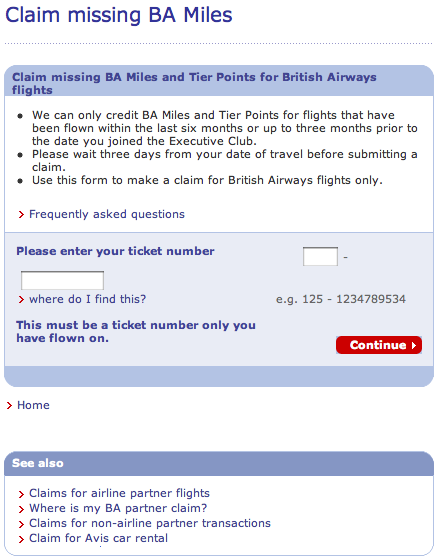
At the time of writing this article, I did not have any uncredited miles to claim from BA, but just to see what was on the next page, I entered the ticket number of an older flight that had already been credited to my account. Here’s what I got:
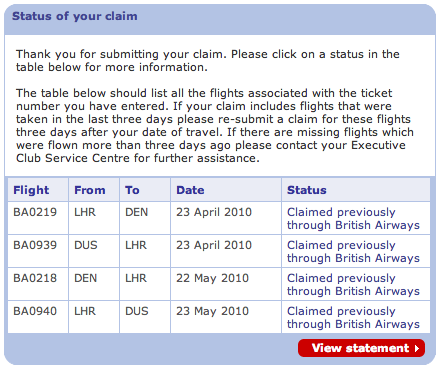
Since I have never submitted a claim with BA, I have no idea how much data you have to enter if an uncredited flight is found. I deem it fairly obvious, however, that the overall process is much smoother on BA.com than it is on the Miles & More site:
-
I don’t have to go search for the “Claim missing BA miles” form because the link to it is located exactly where I would look for it in the first place.
-
The language used by BA makes it easier to understand where that link takes me.
-
For the first step of the process, all I have to enter is the ticket number.
- Based on the ticket number, the BA website verifies whether miles have already been credited for the corresponding flights, which may spare me additional effort in case I have simply overlooked them on my account statement.
Of course, this is only one task of many that you can perform on an airline’s website. And yet, I find it striking that a standard function like claiming uncredited award miles can differ so fundamentally in how easy, convenient, and sometimes even pleasant they are to use.